Template name : Represent Template type : 1 Sidebar, 2 Column, 3 Column footer, Adapted from Wordpress, Black, Elegant, Featured Section, Fixed width, Header Banner, Magazine, Premium, Right Sidebar, Slider, Tabbed widget, Top Navigation Bar, Web 2.0, White Release date : April 27, 2011 Coder/Designer Name(s) : Lasantha Bandara / Free WordPress Themes Coder/Designer URL(s) : http://www.premiumbloggertemplates.com/ and http://fthemes.com/
Configure Featured Content Slider:
Login to your blogger dashboard--> layout- -> Edit HTML. Find <!-- Featured Content Slider Started -->. Now scroll down slowly and you can see each featured slide codes between <div class='fp-post'> and </div> .
Now replace,
"This is default featured post X title" with your featured post title.
"featured-post-X-url-here" with your featured post URL.
"Go to Blogger edit html and find these sentences.Now replace these sentences with your own descriptions.This theme is Bloggerized by Lasantha Bandara - Premiumbloggertemplates.com." with your slider description.
Slider image address with your slider image.
for each featured slide
How To Configure Second Navigation Menu
Find <div class='menu-secondary-wrap'> inside your template (using CTRL+F). This is the beginning of the navigation menu. Now follow the steps given here:
Now change the names "Videos", "Tags" and "Blog Archives" as you like.
How To Add a Header Logo
You can add a header logo for this template easily in the "Page Elements" section(Blogger Default Method). Logo image size must be 316px width and 70px height.
Important : Please do not remove the footer credit. So that you can use it for your blog, stay the credit intact.
License:
This free Blogger template is licensed under the Creative Commons Attribution 3.0 License, which permits both personal and commercial use.
However, to satisfy the 'attribution' clause of the license, you are required to keep the footer links intact which provides due credit to its authors. For more specific details about the license, you may visit the URL below:
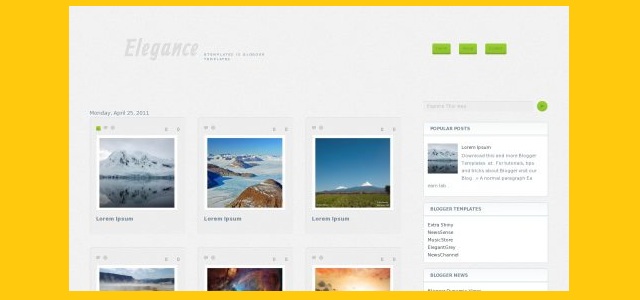
Elegance Gallery is a free premium blogger template with 4 columns, right sidebar, gallery-styled, web 2.0 design, rounded corners, exclusive design for Blogger, space for ads, footer columns, twitter support, neutral colors and posts thumbnails.
Excellent layout for blogs about kids or photography.
Simposium is a free blogger template with 2 columns, FIXED left sidebar, grunge style, exclusive design for Blogger, floral motifs and posts thumbnails.
Excellent layout for blogs about art, desktop, electronics, girls or kids.
DotNews is a free blogger template adapted from WordPress with 3 columns, sidebar on the right and left, magazine-styled, space for ads, slideshow, posts thumbnails, tabs and drop down menu.
Luxury Yatching is a free premium blogger template adapted from WordPress with 2 columns, right sidebar, magazine-styled, footer columns, slideshow and posts thumbnails.
Pinkvisor is tree columns fixed width WordPress theme by MagPress.com. This Pink WordPress template has theme options, featured content slider, featured categories, Adsense ready, Twitter and many more.
Tags: 2 sidebar, 3 column, adsense ready, Custom Menu, Featured Content, Left Sidebar, Pink, Right Sidebar, Theme Options, Threaded Comments, Twitter Ready, White, Widget Ready, wordpress
Solarmag is a two columns fixed width WordPress theme by MagPress.com. This WP theme comes with theme options, featured posts, Adsense ready, sidebar tabbers, footer widgets and many more.
Tags: Adsense Ready, Black, Custom Menu, Featured Content, Fixed Width, Horizontal Navigation, Right Sidebar, Sidebar Footer, Tabber, Theme Options, Threaded Comments, Three Level Dropmenu, Two Columns, White, Widget Ready, Wordpress
Techa is a three columns fixed width WordPress theme by MagPress.com. This Dark Blue WordPress template comes with customized homepage layout, custom first/latest post display, custom recent posts block, featured categories, Adsense ready and many more.
Tags: Adsense Ready, Custom Menu, Dark Blue, Featured Video, Fixed Width, Horizontal Navigation, Right Sidebar, Sidebar Footer, Theme Options, Threaded Comments, Three Columns, Three Level Dropmenu, Twitter Ready, Widget Ready, Wordpress
The Minimal Swiss Design theme by Marios Lublinski (released by Smashing Magazine) is just one of those templates. Ideally suited to artists and designers, this simple and beautiful template instantly inspired me to create a Blogger conversion (including additional theme options for customizing the design).
There are two versions of a Minimal Swiss Design theme for download are:
Show post titles on all pages (V2)
No post titles (except on item pages)
This blogger template for free under the GPLv2 License, which means you can use them for all your projects for free and without any restrictions.
Features of this template
Minimal Swiss Design is a simple CSS-based template which uses no external JavaScript and loads swiftly in the browser.
It features a three column layout with two narrow sidebars which are ideally suited to Picture gadgets for display of visual portfolio items and is wholly compatible with the Blogger template designer for customization of backgrounds, colours and fonts.
More features include:
Widget sections in the header for address details and social media links
Use of custom fonts from the Google Font Directory
Choose to display post titles only on item pages (perfect for a portfolio site) or site-wide
Upload your own background image using the Blogger template editor
Change all background colours, fonts and font colours to create a visual theme of your own
I've checked the design in a wide variety of browsers and am assured of it's compatibility right back to Internet Explorer 6!
How to install this template
This Minimal Swiss Design template works right out of the box and can be installed in just a few mouse clicks!
First you'll need to download the version you would like to use:
Show post titles on all pages (V2)
No post titles (except on item pages)
Once you've downloaded the appropriate file, extract the template to a location on your computer.
Now log into your Blogger dashboard and go to Design>Edit HTML. Near the top of this page you'll see a section where you can choose to "Upload a new template". Click this button which will prompt you to locate the XML file for your template.
Select your extracted template file and click "Upload".
Note: You may receive a notice that gadgets in your existing template are not present in the new design. If you would like to keep these widgets, select "Keep widgets" from the options available (alternatively you can choose to delete these widgets).
Once the upload is complete, choose to "View blog" to see the new template in action.
Add your gadgets to the sidebar
This template was designed primarily to be used as a portfolio site and is very suited to image gadgets in the sidebars.
Go to Design>Page Elements to add gadgets to your layout. When you add Picture gadgets through this page, the images you upload will be automatically resized to fit the sidebar's width.
Note: Gadget titles in the sidebar will appear if present (using the "Syncopate" font used for the blog title). If you do not want to display gadget titles, do not add a title for your gadget.
Customize the design
This template is fully compatible with the Blogger template designer, enabling us to customize the appearance using the WYSIWYG editor with live previews. You can even remove the background image and replace it with an image of your own!
To customize the Minimal Swiss Design template, simply go to Design>Template Designer in your Blogger dashboard and select your chosen options from the menu in the left column:
It is available for use under the GPLv2 License which enables free use for all your personal and commercial projects without the requirement of attribution. In other words, you don't have to link back to Blogger Buster or Marios Lublinski (though of course we wouldn't complain if you do!).
If you'd like to spread the word about this free template, please link to this article rather than the actual download link so others may find complete instructions for installation, customization and credits.